Place RFA Stiffener Settings


Summary
Place RFA Stiffeners Settings is where you define the rules eVolve uses when you run Place RFA Stiffeners. Each rule matches duct by type, service, material, and size, then tells eVolve which stiffener family to place and how to space it.
eVolve tab ⮞ Quick Tools panel ⮞ Place RFA Stiffeners Dropdown ⮞ Place RFA Stiffener Settings button 

Prerequisites
- None — the settings grid opens empty on a new project and rules are stored with the project.

Usage
- Open Place RFA Stiffeners Settings from the eVolve Mechanical ribbon.
- Click Click here to add a new row (or the + button in the grid's bottom toolbar) to start a new rule.
- Under Apply To, set the conditions the rule should match: Type (Duct - Oval, Duct - Rectangular, or Duct - Round), Service, Material, and a size range using Size >, Size <=, and Size By.
- Under Placement, choose a Position and fill in Spacing and/or End Offset as that position requires.
- Under Stiffener, choose a Family and Family Type to place.
- Make sure Enabled is checked for the rule to be used.
- Click Apply or OK to save your changes.

Window Overview
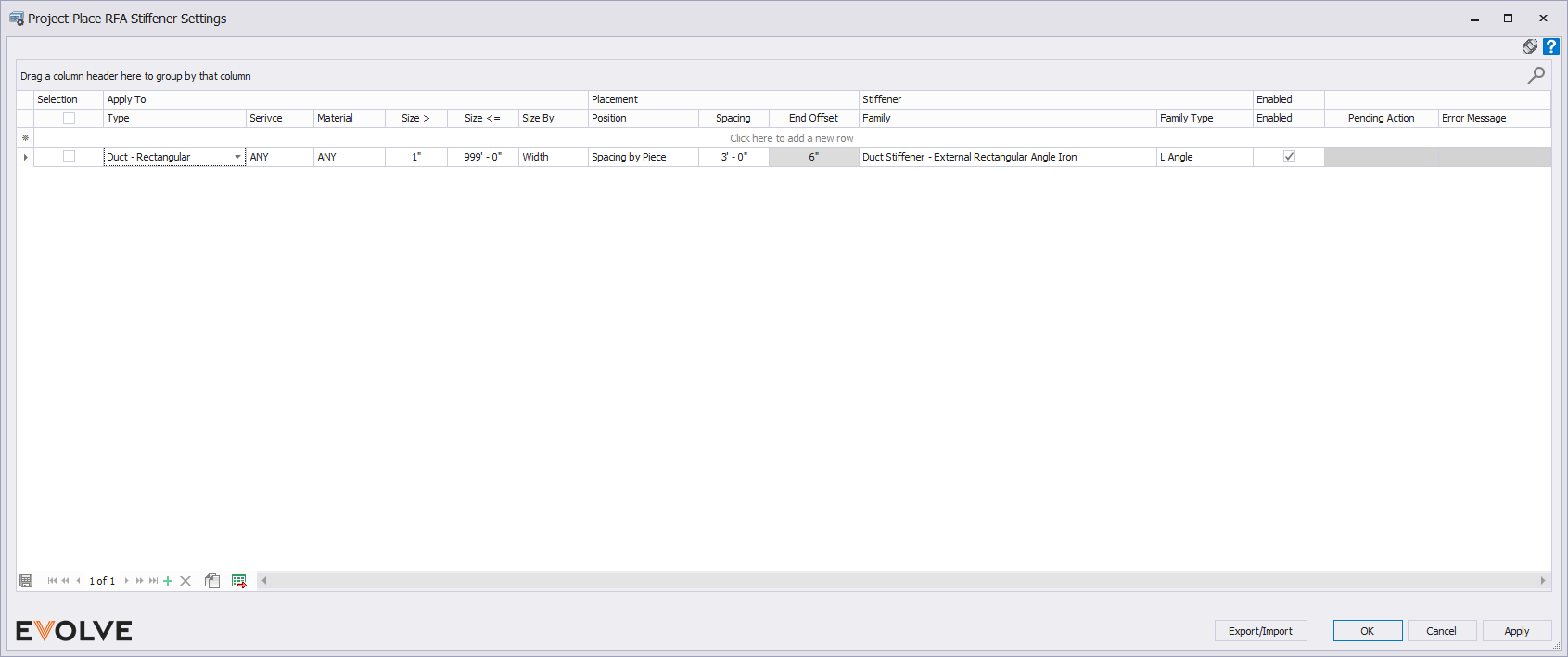
Apply To
- Type — The duct type the rule applies to: Duct - Oval, Duct - Rectangular, or Duct - Round.
- Service — The duct's system service (ANY, Supply Air - 4wg, Supply Air - 2wg, Exhaust Air - 2wg, and so on). Choose ANY to match every service.
- Material — The duct material the rule applies to.
- Size > / Size <= — The size range the rule covers.
- Size By — Which dimension the size range measures against: Value, Width, Depth, or Half Perimeter.
Placement
- Position — How stiffeners are positioned along the duct: Value, Center, Center and End, End Offset, Spacing by Piece, or Spacing by Run.
- Spacing — The distance between stiffeners. Only editable for position options that use spacing.
- End Offset — The distance from the end of the duct to the nearest stiffener. Only editable for position options that use an offset.
Stiffener
- Family — The loadable family to place, for example Duct Stiffener - External Rectangular Angle Iron, Duct Stiffener - External Round, or Duct Stiffener - Internal Oval.
- Family Type — The type within that family to use.
Enabled, Pending Action, and Error Message
- Enabled — Turns the rule on or off without deleting it.
- Pending Action and Error Message — eVolve flags an incomplete rule in red and reports what's missing here (for example, "Family must be provided.") until you fill in every required field.
Tips and Tricks
- You can add multiple rules to cover different duct types, services, or size ranges — eVolve uses whichever enabled rule matches the duct you select when you run Place RFA Stiffeners.
- Use Size > and Size <= together to scope a rule to a specific size band, rather than applying it to every duct of that type.
- If Place RFA Stiffeners doesn't place stiffeners on a duct segment you expect it to, check here first for a rule that's disabled, misconfigured, or doesn't cover that duct's type, service, material, or size.

Best Practices
- Reference your fabrication database or company standards for sizing and stiffener spacing.


